• Home
  • Games
    Action-adventure Simulation Business Role Playing Sports Competition Casual Intelligence Card Strategy Music Rhythm Text Puzzle
  • Apps
    Business Office Newsletter Social Life Entertainment Online Shopping Practical Tools Travel Educational Learning Information Reading Sports and Health
  • Articles

English 中文(简体) 中文(繁体) 한국어 日本語 Português Español Русский العربية Indonesia Deutsch Français ภาษาไทย
Home Apps Practical Tools Sense Analog Small Black 4x1
Sense Analog Small Black 4x1

Sense Analog Small Black 4x1

1
2
3
4
5
Download
  • Version 4.2.4
  • Category Practical Tools
  • Package Name factory.widgets.SenseAnalogThinBlack
  • Update Time July 11, 2025
  • Size 2.63MB
About this app

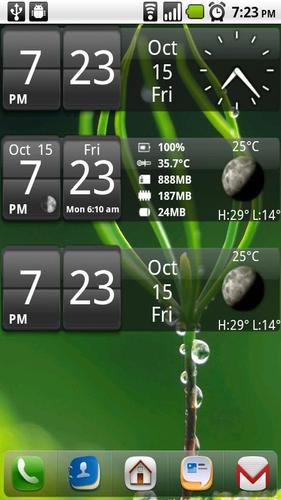
Android Digital clock widget with Calendar, Time, System info,weather & forecast

Digital weather and system info clock widget with size 4x1

It features:

12/24 hr + Color options on all info displayed

System Stats Info

High resolution weather icons

Option for minutes color to be the same as hours

Option for alternative forecast layout

Weather & Forecast (International)

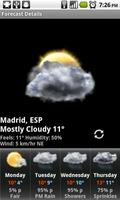
Two weather forecast layouts

Interaction:

+tap center->preferences

+tap weather icon->forecast

+tap Hours->launch anything!

+tap Minutes->launch anything!

+tap the moon icon in weather forecast screens

for detailed views on moon-phases for the current day, current month and the years half and full phases.

Widgets on Android work a bit differently than a normal application. Unlike regular programs they don't just install themselves in the application tray so you have to add them manually. They will not open or launch.

Here's how to add a widget on your Android home screen.

STEPS HOW TO ADD A WIDGET

==========================

1.On your Android home screen, tap any blank or “empty” area with size 4x1 and hold down your finger.

2.An “Add to Home screen” window will pop up. From that window, tap “Widgets”.

3.You’ll be presented with a list of all the installed Widgets on your Android device.

4.Select the clock to add to your home screen by tapping it.

Notes

=====

"Time frozen/not updating"-> taskiller killed the clock(exclude it from taskillers)

When phone starts, clock starts in less than a min too.

ROM users-> make sure the clock is NOT moved on SD card.

Widgets are not supposed to be on SD card. Move it back to the phone storage.

Weather hint: For world destinations with two words in the name, type in the box the words with a plus sign.

For example "Buenos Aires" type "Buenos+Aires",remember the "+" sign -no spaces, don't include the quotes.

Email problems/suggestions

Check our website for more help.

EXCLUDE IT FROM TASKILLERS!!!

Be polite, this is a free app :-)

VIDEO HOW TO ADD WIDGETS

http://www.youtube.com/watch?v=DpMLF9b2aTQ

What's New in the Latest Version 4.2.4

Last updated on Jul 24, 2015 4.2.4
*weather fixes
4.2.2
* fix weather location
* other fixes
4.2
* support for more devices
* many code improvements
* added moon phases in the forecast screen.
Launch by pressing the moon icon in weather forecast screens
for detailed views on moon-phases for the current day, current
month and the years half and full phases.
* added battery option on the clock
* added Sunrise/Sunset times, Day length and hours left in the forecast screens
! -->PLEASE REMOVE AND ADD WIDGET AGAIN<-- !
Download(2.63MB)
Users also viewed
  • Cartoon Camera

    Cartoon Camera

    1.0 December 25, 2025
  • AFTrack Grib plugin

    AFTrack Grib plugin

    1.0.6 December 25, 2025
  • Pasatiempo Telcel

    Pasatiempo Telcel

    12.00 December 25, 2025
  • Home Furnishings

    Home Furnishings

    5.1.0 December 24, 2025
  • Lava Go Keyboard Theme

    Lava Go Keyboard Theme

    1.188.1.84 December 24, 2025
  • Dialer Theme G Black Orange

    Dialer Theme G Black Orange

    350 December 24, 2025
  • FLOQ Speedtest

    FLOQ Speedtest

    2.7.1995 December 24, 2025
  • TL Flash Light

    TL Flash Light

    1.01 December 23, 2025
  • Full size Wallpaper

    Full size Wallpaper

    1.7.1.3 December 23, 2025
  • DVR:Blue Darkness

    DVR:Blue Darkness

    1.0 December 23, 2025
  • I-REACT

    I-REACT

    1.5.5 December 23, 2025
  • instax SHARE

    instax SHARE

    3.4.9 December 23, 2025
  • Lava Care

    Lava Care

    16.3 December 23, 2025
  • Big Clock Widget

    Big Clock Widget

    1.4 December 23, 2025
  • oiot.ru

    oiot.ru

    4.11.12 December 23, 2025
About Privacy Policy Terms of Service Cooking Policy

© Copyright 2017-2025 downde.com