• Home
  • Games
    Action-adventure Simulation Business Role Playing Sports Competition Casual Intelligence Card Strategy Music Rhythm Text Puzzle
  • Apps
    Business Office Newsletter Social Life Entertainment Online Shopping Practical Tools Travel Educational Learning Information Reading Sports and Health
  • Articles

English 中文(简体) 中文(繁体) 한국어 日本語 Português Español Русский العربية Indonesia Deutsch Français ภาษาไทย
Home Apps Business Office Smart Setting
Smart Setting

Smart Setting

1
2
3
4
5
Download
  • Version 1.0.2
  • Category Business Office
  • Package Name com.smart.quicksettings.extendedcontrol.homescreenfree
  • Update Time August 19, 2025
  • Size 685.12KB
About this app

Enjoy millions of the latest Android apps, games, music, movies, TV, books, magazines & more. Anytime, anywhere, across your devices.

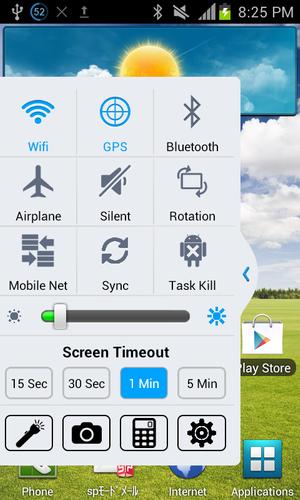
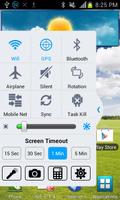
Control every thing instantly from anywhere any time with this handy tool, EVERYTHING FROM AIR. Yes! it will not occupy any screen space except small place for handle, but will always remain in screen. With this tool you will get easy access to control-

1. Wifi(on/off)

2. GPS

3. Bluetooth(on/off)

4. Airplane mode(on/off)

5. Ringer mode(Normal/Vibrate/Silent)

6. Screen rotation(on/off)

7. Mobile net(on/off)

8. Sync(on/off)

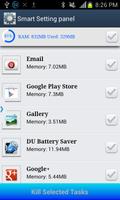
9. Task kill(manual select/select all)

10. Screen brightness

11. Timeout

Along with these you will get shortcut for

1. Flash light

2. Camera

3. Calculator

In pro version-

1. Set panel position(Left/Right/Bottom, Left only in free)

2. Selecting panel theme(8 colors)

3. Selecting mobile net type(2G/3G/LTE...)

4. No ad

How to use

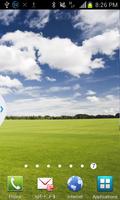
After install open the app, a dialog will show some guideline. After confirmation the panel will be placed in home screen. Use handle to make the panel visible and invisible. Only handle will be visible when panel is invisible. A notification will be shown always in notification panel, taping on that notification anytime you can remove the panel and again launch the app to make panel present in screen. Hope everybody will enjoy this app.
What's New in the Latest Version 1.0.2

Last updated on Sep 10, 2015 1.0.2-Toggle button touch problem fixed
Download(685.12KB)
Users also viewed
  • Quick History Cleaner

    Quick History Cleaner

    1.0 January 22, 2026
  • ActionBar Toggle Sample

    ActionBar Toggle Sample

    1.2 January 21, 2026
  • XM

    XM

    3.35.1 January 21, 2026
  • My BASE

    My BASE

    4.6.0 January 21, 2026
  • Color Collection, palettes

    Color Collection, palettes

    5.0 January 21, 2026
  • LuluBox For Android

    LuluBox For Android

    1.1.0 January 20, 2026
  • Next Talk Call Reminder Trial

    Next Talk Call Reminder Trial

    2.1.4 January 20, 2026
  • GeoComply Demo

    GeoComply Demo

    1.0.0 January 20, 2026
  • Biblium Mobile

    Biblium Mobile

    0.0.113.0 January 20, 2026
  • Tuscany Dive

    Tuscany Dive

    1.21 January 20, 2026
  • NRSV Bible app

    NRSV Bible app

    Nrsv Bible App 5.0 January 20, 2026
  • eAction Log

    eAction Log

    1.2 January 19, 2026
  • 100 GB storage SD

    100 GB storage SD

    1.7 January 19, 2026
  • Damaged Sd card Formatter

    Damaged Sd card Formatter

    20.0 January 18, 2026
  • Arduino BT LED Strip Control

    Arduino BT LED Strip Control

    0.1a January 17, 2026
About Privacy Policy Terms of Service Cooking Policy

© Copyright 2017-2026 downde.com