

Screenshot without root needed! This snapshot app has way too many features!
The most complete and easy to use screenshot app for your tablet, phone or other Android device! No root is required for you to take a snapshot!
★★Most complete screenshot app!★★
Unfortunately the app contains so many features that we cannot list all of them. We’re not kidding, just give it a try, it has more features than any other screenshot app.
★★We're looking for people who are interested in helping to translate the app. If you are please contact us by email!★★
If your phone is not rooted the app should also be able to work. However, because of the way how Android works you might need to take some extra steps, just have a look at the FAQ below (as a side note, you don’t need to root your phone).
Some features
- View all taken screenshots and edit / save / share them. Even send / edit / save multiple at the same time.
- Add “Screenshot adjustments” to every screenshot.
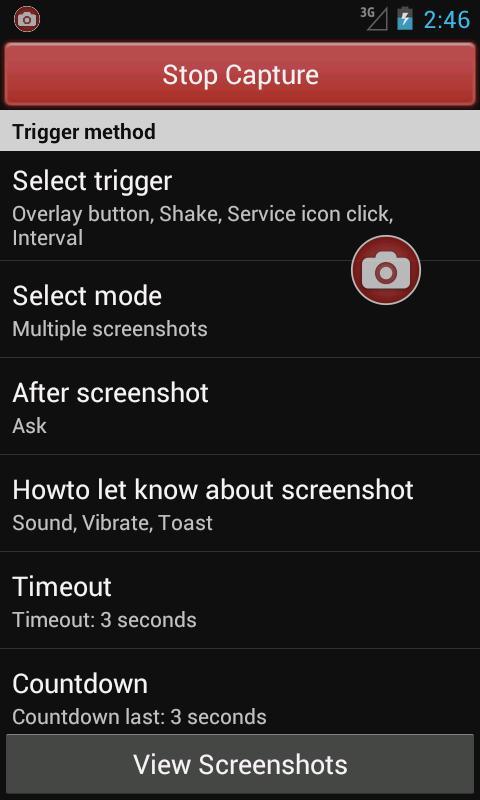
- Optional timeout and countdown.
- Email multiple screenshots or save them to a compressed zip file.
- A lot of easy to use settings so you can completely personalize the screenshot app.
- Draw, add text, rotate, overlay a custom image, mirror and/or crop.
- Upload single or multiple screenshots to Imgur, Glowfoto, ImageShack, POST to server, TwitPic or Tumblr!
- A lot of different capture methods (about 11) with an auto detect option.
- We even included a color picker, it will show the hex, argb, hsl, hsb and cmy color for a selected pixel.
- Specify save folder, save filename (with custom numbering), shutter sound, trigger media scan and more!
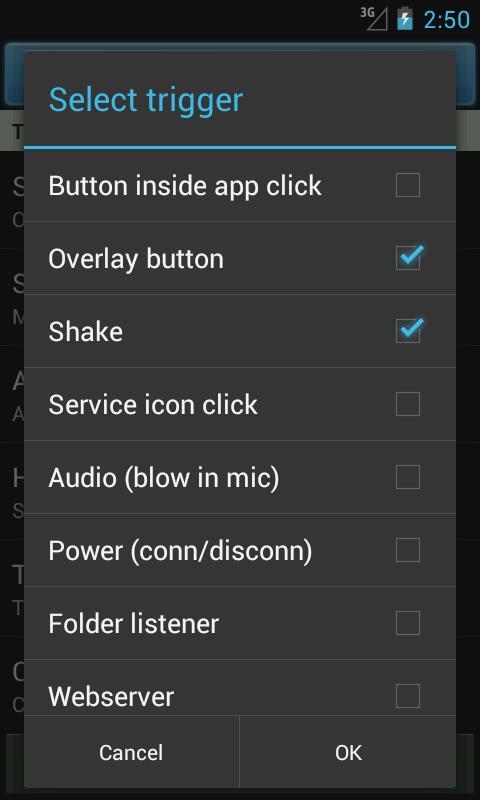
All available trigger methods
- Button inside the app
- Shake
- Service icon
- Overlay button
- Audio (blow in the mic)
- Power (connect or disconnect)
- Webserver
- Interval
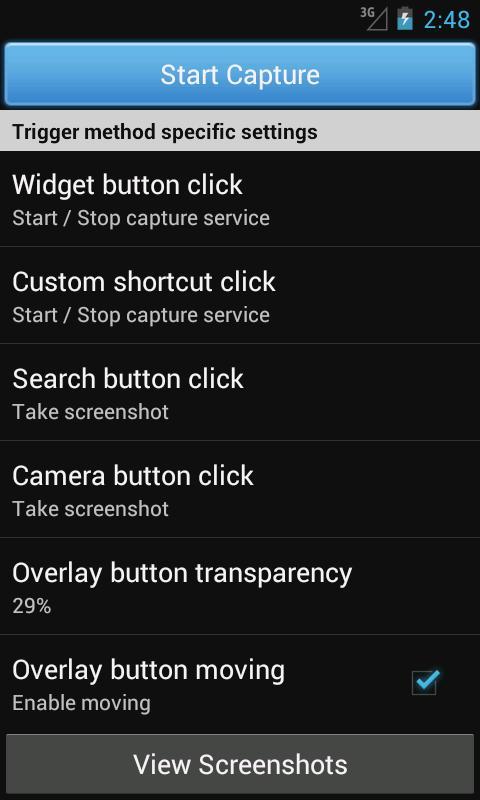
- Long click search hardware button
- Custom shortcut
- Camera hardware button
- Widget
- Folder listener
Frequently asked questions
What does the trial mean?
This app will allow 16 screenshots after which you can decide whether you want to pay for the full version, which has no limits and ads. We have put a lot of money and time in this app so unfortunately we need the paid version, sorry... If you have questions just contact us.
What can I do with the “Folder listener” trigger?
Sometimes your Android device has built-in screenshot capability. If that is the case you can use the folder listener to listen for newly created images in a specific folder. If an image is created in that folder and the capture service is running, Screenshot Now will trigger for editing, saving, sharing, etc! You can also use another screenshot app like Screenshot UX, Screenshot ER or Screenshot It and use Screenshot Now to handle the editing and saving.
The auto detecting didn’t find a single screen capture method!
It’s quite normal if your device isn’t rooted. The reason it’s hard for apps to take a screenshot is because Android normally doesn’t allow it for security reasons. But if you follow the manual inside the app you can easily fix it, without rooting your phone/tablet. Go to “Screenshot Now” -> “Help” -> “No capture method help” and follow the tutorial. You will use your computer (Windows, Linux or OSX) to install a small file on your phone which will enable screenshots. This is a small bug in Android which we use for taking screenshots. If you need help just contact us.
I need help!
Just contact us by email, and we will help you.
Links
Visit us on: https://www.icecoldapps.com
Follow us on Twitter: https://twitter.com/IceColdApps
Like us on Facebook: https://www.facebook.com/IceColdApps
Permissions
- Record audio: for the audio trigger (blow in the microphone for screenshot)
- Boot: allow the capture service to start on boot (optional)
- Internet: ads and uploading to Imgur
- System alert window: for the overlay icon
- Vibrate: to alert screenshot taken
- Write to external storage: save screenshots
- Wake lock: optional set device to stay on















 Download