
• Home
  • Games
    Action-adventure Simulation Business Role Playing Sports Competition Casual Intelligence Card Strategy Music Rhythm Text Puzzle
  • Apps
    Business Office Newsletter Social Life Entertainment Online Shopping Practical Tools Travel Educational Learning Information Reading Sports and Health
  • Articles

English 中文(简体) 中文(繁体) 한국어 日本語 Português Español Русский العربية Indonesia Deutsch Français ภาษาไทย
Home Apps Practical Tools Voice Caller
Voice Caller

Voice Caller

1
2
3
4
5
Download
  • Version 1.1.0
  • Category Practical Tools
  • Package Name it.sngnet.android.voicecaller
  • Update Time September 4, 2025
  • Size 161.08KB
About this app

Voice Dialer that allows you to call your contacts just with one click

Voice Caller is a Voice Dialer that allows you to call your contacts just with one click.

Instructions:

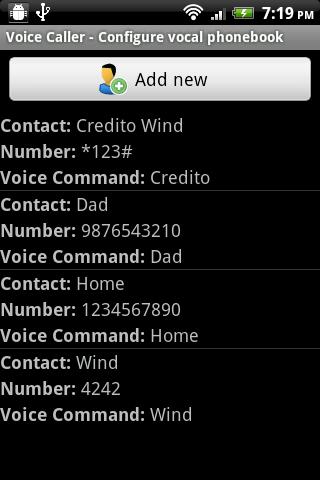
Create your vocal phonebook choosing contacts that you want to call with Voice Caller from your device phonebook, associate them with a unique vocal identifier (the word to speak to call the contact) and start to use the application.

With a limitated and well defined set of vocal commands defined by the user, the speech recognition of Voice Caller is very accurate.

To confirm the call say one of the commands: "yes", "ok", "okay", "call", "confirm".

To discard the call say one of the commands: "no", "cancel", "abort", "discard".

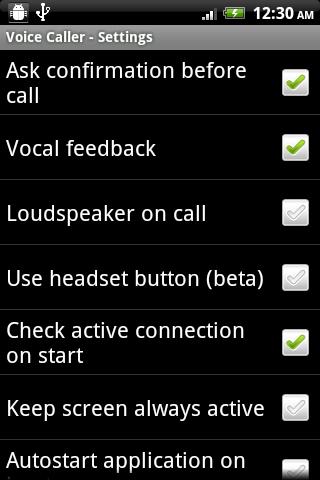
In the settings menu, you can also configure your application for:

- define the dialog process complexity (with confirmation on call and vocal feedback).

- check the presence of an active connection (needed for the speech recognition).

- automatically turn on the loudspeaker during phone call.

- use handset button instead of button on screen (beta version).

- keep the screen always active (warning, major battery consumption).

- autostart the application on boot device.

For comments, reports, suggestions and so on, don't esitate to send an e-mail.

What's New in the Latest Version 1.1.0

Last updated on Jun 29, 2015 1.1.0:
Added two more functions in the settings menu:
- use handset button instead of button on screen (beta version).
- keep the screen always active (warning, major battery consumption, use when plugged or when it's necessary like in the car).

---

1.0.3:
Added new vocal commands to confirm or discard the phone call.
Open the info dialog (menu->info) for guide and more info.


Download(161.08KB)
Users also viewed
  • Lotus Pond Live Wallpaper

    Lotus Pond Live Wallpaper

    1.4 January 22, 2026
  • Archos Weather Station

    Archos Weather Station

    1.4.2 January 22, 2026
  • Anime HD Keyboard

    Anime HD Keyboard

    1.279.1.129 January 22, 2026
  • Move4U Survey App

    Move4U Survey App

    1.4.0 January 21, 2026
  • Status Report - Device Info, U

    Status Report - Device Info, U

    1.0925 January 21, 2026
  • Beautiful Camera HD

    Beautiful Camera HD

    1.2.3 January 21, 2026
  • Civil Engineering Calculations

    Civil Engineering Calculations

    1.71 January 21, 2026
  • Sweet Home AVR (Unreleased)

    Sweet Home AVR (Unreleased)

    9.99 January 21, 2026
  • US Robot Stickman Rope Hero -

    US Robot Stickman Rope Hero -

    1.0 January 21, 2026
  • NotifyClean

    NotifyClean

    3.8.6 January 21, 2026
  • A Light: 1-Click Flashlight

    A Light: 1-Click Flashlight

    2.6 January 21, 2026
  • Be with you - Locker Theme

    Be with you - Locker Theme

    1.2 January 21, 2026
  • Ilmajaam

    Ilmajaam

    5.6.4 January 21, 2026
  • Metal X GO Launcher Theme

    Metal X GO Launcher Theme

    v1.0 January 21, 2026
  • Grocery Lists  Make Shopping Simple and Smart

    Grocery Lists Make Shopping Simple and Smart

    5193 v1 January 21, 2026
About Privacy Policy Terms of Service Cooking Policy

© Copyright 2017-2026 downde.com