

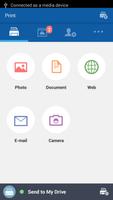
Samsung Cloud Print is a free cloud service for Samsung Printers.
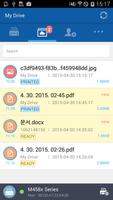
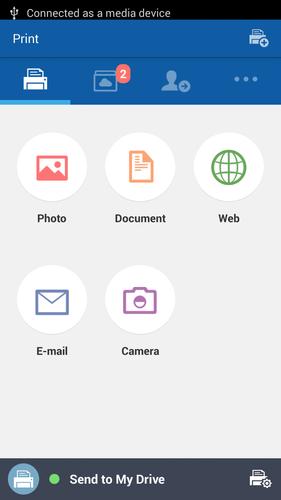
Samsung Cloud Print is a free cloud service that allows you to print from your smartphone or tablet to your Samsung printer or MFP and scan files directly from supported Samsung MFP devices to you or your friend’s free, secure cloud based My Drive Account from where they can be previewed or printed.
During installation of the Samsung Cloud Print app, you register with the Samsung Cloud Print service just using your mobile number for authentication.
Your mobile device and network connected printer or MFP can be paired automatically by tapping the built in NFC tag on certain models. Supported Printers & MFPs on the same WiFi network as your mobile device can be searched & registered with a single button press or alternatively you can manually enter its MAC address. Once paired, you can print or scan from anywhere and everywhere.
Samsung Cloud Print allows you to print Microsoft Word and PowerPoint documents, as well as PDF and image files, e-mail messages and web pages. You can send scanned files from your MFP to anyone using Samsung Cloud Print using their mobile number. For more details, visit www.samsungcloudprint.com.
[Key features and Benefits]
- Intuitive user interface.
- Use your mobile number to authenticate -- no other login necessary.
- Pair to your Samsung printer or MFP using NFC, WiFi connection or by inputting MAC address from smart phone.
- Supported printable contents are Microsoft Word and PowerPoint documents, PDF, image files, e-mail messages and web pages.
- Using the Samsung Cloud Print PC Driver, send any print job from your PC to your registered print devices or your dedicated cloud storage area.
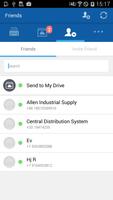
- Send print jobs to other Samsung Cloud Print app users or their shared print devices.
- Upload print jobs to "My Drive" to print later from any Samsung Cloud Print-enabled Samsung printer or MFP.
[Etc.]
- Printing directly from the cloud service only to selected Samsung printers and MFPs.
- Uploaded files in the cloud are deleted after 72 hours.
- Data size of print and scan may be limited depending on the selected media size.
- Supports cloud printing/scanning using cellular data network (2G, 3G, LTE etc.) or Wi-Fi.
[Supported environment]
- Android 4.1 and above.
[Compatible Samsung Printers and MFPs]
Visit the web site http://www.samsungcloudprint.com
[App Access Privilege]
To provide quality service, the app needs below app access privilege. You can use basic function of
app without consent of Optional App access privilege:
- Mandatory Access Privilege
. Storage: The purpose is to access files to be printed, saved to the user's cloud-based account
. Internet: The purpose is to send requests and receive responses to and from the server
. Contacts: The purpose is to add and manage the user's friends
- Optional Access Privilege
. Camera: The purpose is to take photos to be printed, saved to the user's cloud-based account
. SD card: The purpose is to access files to be printed, saved to the user's cloud-based account
. Browser: The purpose is to access web pages to print, save to the user's cloud-based account
. NFC: The purpose is to register NFC enabled printers




 Download