• Home
  • Games
    Action-adventure Simulation Business Role Playing Sports Competition Casual Intelligence Card Strategy Music Rhythm Text Puzzle
  • Apps
    Business Office Newsletter Social Life Entertainment Online Shopping Practical Tools Travel Educational Learning Information Reading Sports and Health
  • Articles

English 中文(简体) 中文(繁体) 한국어 日本語 Português Español Русский العربية Indonesia Deutsch Français ภาษาไทย
Home Apps Practical Tools Hello Kitty Launcher "Ribbon"
Hello Kitty Launcher "Ribbon"

Hello Kitty Launcher "Ribbon"

1
2
3
4
5
Download
  • Version 1.0.0
  • Category Practical Tools
  • Package Name jp.co.sanriowave.android.zucks.plushome_kt004
  • Update Time September 11, 2025
  • Size 4.16MB
About this app

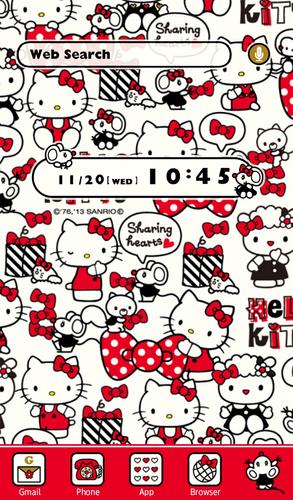
40th Anniversary Free Hello Kitty Launcher☆Ribbons are symbols of friendship♪

40th Anniversary Free Hello Kitty Launcher☆

Kitty's ribbons are symbols of friendship♪Share these ribbons and share your friendship!

■Compatible OS

Android OS 2.1 and above

■Supported Devices (updated as necessary)

http://android.atm-plushome.com/theme/supported

* Testing has been completed for the devices listed on the above website.

Note: Available settings may vary slightly according to device and theme.

■Launcher Features

Free Hello Kitty Launcher: "Ribbon Girl" version.

Transform your home screen with Hello Kitty!

Features of this launcher include...

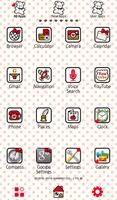
★An adorable Hello Kitty-filled home screen

★Packed full of Hello Kitty and her Ribbons! Simple and fashionable♪

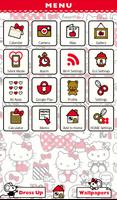
★A menu screen full of the most useful menu items.

★Fantastic clock and search widgets!

*To use this launcher, the [+] HOME (Plus Home) app is required.

▼[+] HOME 【FREE】 Download▼

https://market.android.com/details?id=jp.co.a_tm.android.launcher

■How to set the theme on your phone

1) Install Hello Kitty "Ribbon Girl".

2) Select Hello Kitty "Ribbon Girl" from APP overview (drawer).

3) Click OK on the window displaying the "Cannot find [+]HOME" message, and go to Google Play.

4) Install "[+]HOME FREE"and open.

5) Return to the home screen and select "MENU", then select "Theme".

6) Select Hello Kitty "Ribbon Girl" from among the themes.

7) Setting Complete.

Existing [+]HOME users can start from step 5 after completing the APP overview (drawer) settings.

(C)1976, 2013 SANRIO CO., LTD. (E)

What's New in the Latest Version 1.0.0

Last updated on Aug 25, 2015 =======

■News
If you experience iss+L41ues with improper display or errors, please close and restart the app. Most issues can be fixed with this simple step.

■Any Questions?
http://android.atm-plushome.com/theme/qa.html?=am_plushome_ds_1
* Correspondence available in English or Japanese

■Supported Devices (updated as necessary)
http://android.atm-plushome.com/theme/supported?=am_plushome_ds_1


=======

Download(4.16MB)
Users also viewed
  • AFTrack Grib plugin

    AFTrack Grib plugin

    1.0.6 December 25, 2025
  • Pasatiempo Telcel

    Pasatiempo Telcel

    12.00 December 25, 2025
  • Home Furnishings

    Home Furnishings

    5.1.0 December 24, 2025
  • Lava Go Keyboard Theme

    Lava Go Keyboard Theme

    1.188.1.84 December 24, 2025
  • Dialer Theme G Black Orange

    Dialer Theme G Black Orange

    350 December 24, 2025
  • FLOQ Speedtest

    FLOQ Speedtest

    2.7.1995 December 24, 2025
  • TL Flash Light

    TL Flash Light

    1.01 December 23, 2025
  • Full size Wallpaper

    Full size Wallpaper

    1.7.1.3 December 23, 2025
  • DVR:Blue Darkness

    DVR:Blue Darkness

    1.0 December 23, 2025
  • I-REACT

    I-REACT

    1.5.5 December 23, 2025
  • instax SHARE

    instax SHARE

    3.4.9 December 23, 2025
  • Lava Care

    Lava Care

    16.3 December 23, 2025
  • Big Clock Widget

    Big Clock Widget

    1.4 December 23, 2025
  • oiot.ru

    oiot.ru

    4.11.12 December 23, 2025
  • Mantis Gamepad Pro Beta

    Mantis Gamepad Pro Beta

    3.1 December 22, 2025
About Privacy Policy Terms of Service Cooking Policy

© Copyright 2017-2025 downde.com