


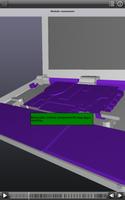
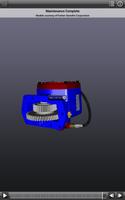
Interactive 3D instructions. Right at your fingertips.
Autodesk Inventor Publisher Mobile Viewer allows you to interactively view animated, interactive 3D assembly instructions created with Autodesk Inventor Publisher software.
Some assembly required? Left the manuals back at the shop? Missed your last product training session?
No problem. With Inventor Publisher Mobile Viewer, you have important product information and instructions at your fingertips wherever you go. Users of Inventor Publisher software can easily publish and share 3D interactive instructions directly to iPhone, iPad and iPod touch.
Together, Inventor Publisher and the Inventor Publisher Mobile Viewer App deliver next generation instructions for visually explaining your ideas, designs, and products.
• Communicate how your products get assembled, used, taken apart, and serviced – or simply what’s great about them!
• Reduce your documentation, service, support and training costs
• Arm your sales force with 3D to win new business
Once you’ve experienced instructions in 3D, you’ll never look at documentation the same way again!
Autodesk Inventor Publisher Mobile Viewer comes with a wide variety of sample files for your enjoyment. To create your own 3D interactive instructions, Autodesk Inventor Publisher software is required.
Features
✓ Zoom, pan & rotate in 3D using Multi-touch
✓ Play or scrub through animated sequences of step-by-step instructions
✓ Double-tap on individual components for detailed part information
✓ View text descriptions and annotations that can help augment 3D graphics
✓ Includes 26 sample instruction files
✓ Store files directly on your device
✓ Autodesk 360 account integration
✓ Simple, more intuitive user interface
Notes:
• Requires Android 2.1 or above. Requires OpenGL 1.1 or above. Recommended devices include: 1GHz processor, 512MB RAM.
• Textures will only appear on Android devices with PowerVR chips when models with textures are published using R2011 and R2012 of Autodesk Inventor Publisher desktop software.
For more information visit:
http://www.autodesk.com/inventorpublisher and http://www.facebook.com/autodeskpublisher










 Download