• Home
  • Games
    Action-adventure Simulation Business Role Playing Sports Competition Casual Intelligence Card Strategy Music Rhythm Text Puzzle
  • Apps
    Business Office Newsletter Social Life Entertainment Online Shopping Practical Tools Travel Educational Learning Information Reading Sports and Health
  • Articles

English 中文(简体) 中文(繁体) 한국어 日本語 Português Español Русский العربية Indonesia Deutsch Français ภาษาไทย
Home Apps Practical Tools Wifi File Manager
Wifi File Manager

Wifi File Manager

1
2
3
4
5
Download
  • Version 1.0
  • Category Practical Tools
  • Package Name com.vegantaram.android.wifi_file_manager
  • Update Time December 29, 2025
  • Size 905.84KB
About this app

Enjoy millions of the latest Android apps, games, music, movies, TV, books, magazines & more. Anytime, anywhere, across your devices.

Description

***** Please send us email with your problems. That way we can help you and possibly update the app version quickly. Don't write haphazard comments in ratings*******

Wifi File Manager is an app for managing your files on your mobile phones, tablets.

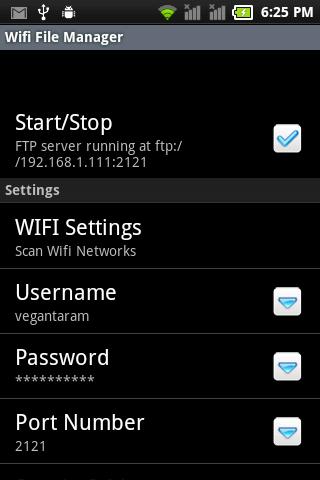
This application transforms your Android phone into an FTP server.

Read/write any folder into sdcard, in your android device with this ftp server.

You can backup your photos to your PC, copy music and movies to you device, etc.

Core features

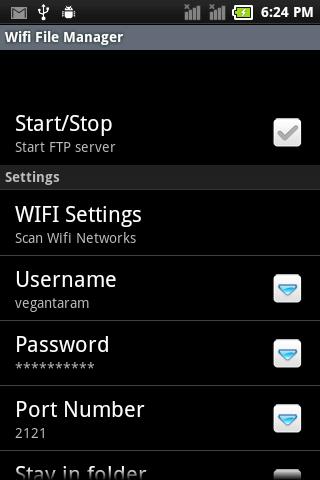
Uses WIFI network interface in your device.

Users can scan available wifi networks and connect to desired network.

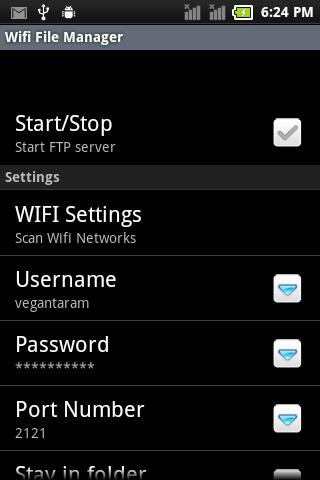
Username and password can be changed.

User can switch between root directory & sdcard.

Read only mode.

Server also runs as a foreground service.

Share your files in the net.

It's free.

Tips:

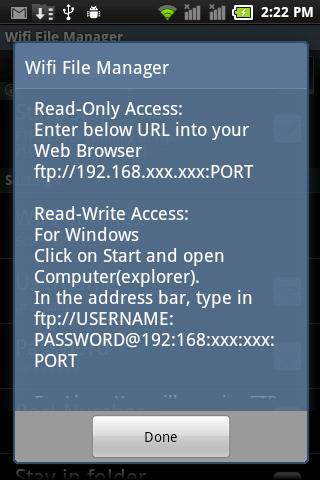
Read-Only Access:

Enter below URL into your Web Browser

ftp://192.168.xxx.xxx:PORT

Read-Write Access:

For Windows

Click on Start and open Computer(explorer)

In the address bar, type in ftp://USERNAME:[email protected]:PORT

For Linux

User will require FTP client such as FILEZILLA

Open Filezilla

In Host: type in ftp://192.168.xxx.xxx

Now enter your Username and Password in the spaces provided.

Enter PORT number in the space provided

Click On Quickconnect.

For MAC OS

User will require FTP client such as CYBERDUCK

Click Open Connection button

Enter 192.168.xxx.xxx in Server

Now enter your Username and Password in the spaces provided.

Enter PORT number in the space provided

Click the Connect button.

Download(905.84KB)
Users also viewed
  • Lotus Pond Live Wallpaper

    Lotus Pond Live Wallpaper

    1.4 January 22, 2026
  • Archos Weather Station

    Archos Weather Station

    1.4.2 January 22, 2026
  • Anime HD Keyboard

    Anime HD Keyboard

    1.279.1.129 January 22, 2026
  • Move4U Survey App

    Move4U Survey App

    1.4.0 January 21, 2026
  • Status Report - Device Info, U

    Status Report - Device Info, U

    1.0925 January 21, 2026
  • Beautiful Camera HD

    Beautiful Camera HD

    1.2.3 January 21, 2026
  • Civil Engineering Calculations

    Civil Engineering Calculations

    1.71 January 21, 2026
  • Sweet Home AVR (Unreleased)

    Sweet Home AVR (Unreleased)

    9.99 January 21, 2026
  • US Robot Stickman Rope Hero -

    US Robot Stickman Rope Hero -

    1.0 January 21, 2026
  • NotifyClean

    NotifyClean

    3.8.6 January 21, 2026
  • A Light: 1-Click Flashlight

    A Light: 1-Click Flashlight

    2.6 January 21, 2026
  • Be with you - Locker Theme

    Be with you - Locker Theme

    1.2 January 21, 2026
  • Ilmajaam

    Ilmajaam

    5.6.4 January 21, 2026
  • Metal X GO Launcher Theme

    Metal X GO Launcher Theme

    v1.0 January 21, 2026
  • Grocery Lists  Make Shopping Simple and Smart

    Grocery Lists Make Shopping Simple and Smart

    5193 v1 January 21, 2026
About Privacy Policy Terms of Service Cooking Policy

© Copyright 2017-2026 downde.com