• Home
  • Games
    Action-adventure Simulation Business Role Playing Sports Competition Casual Intelligence Card Strategy Music Rhythm Text Puzzle
  • Apps
    Business Office Newsletter Social Life Entertainment Online Shopping Practical Tools Travel Educational Learning Information Reading Sports and Health
  • Articles

English 中文(简体) 中文(繁体) 한국어 日本語 Português Español Русский العربية Indonesia Deutsch Français ภาษาไทย
Home Apps Educational Learning MobiLock
MobiLock

MobiLock

1
2
3
4
5
Download
  • Version 2.3.1
  • Category Educational Learning
  • Package Name com.promobitech.mobilock
  • Update Time January 20, 2026
  • Size 4.89MB
About this app

Turns your Android devices into a Kiosk by locking down the default home screen.

Note: This App is for demo purpose only. We do not provide support or product updates to this app. Do not use this app is for business use.

MobiLock lets you turn your Android smartphones or tablets into kiosk mode by locking down the default home screen. Kiosk mode allows the user of the phone/tablet to ONLY access apps that you have allowed. You can easily block access to Games, Browsing, installation of other apps, System settings and more. You are provided with a default password to change settings or ‘Exit’ the kiosk mode.

Want to use MobiLock for your business? Try MobiLock Pro.

Get App : https://play.google.com/store/apps/details?id=com.promobitech.MobiLock.pro

MobiLock Pro Features:

- Remote Device Configuration & Management

- Location Tracking of Devices

- Remotely Push Apps to Devices

- Support for Kiosk Browser

- Support for iOS and Windows 10 devices

Try MobiLock Pro Now. 14-days Free Trial

MobiLock Basic Features:

- Locks down Android smartphones and tablets into kiosk mode

- Blocks user from accessing apps other than the ones you have authorized.

- Block user from playing games and browsing

- Block user from changing System Settings

- You (the Admin of the device) can unlock/exit the kiosk mode on the device with a password

- Ability to set custom wallpaper in the MobiLock Home screen

How to use MobiLock Basic:

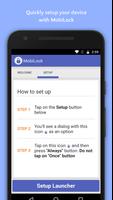
Step 1: Install MobiLock Basic

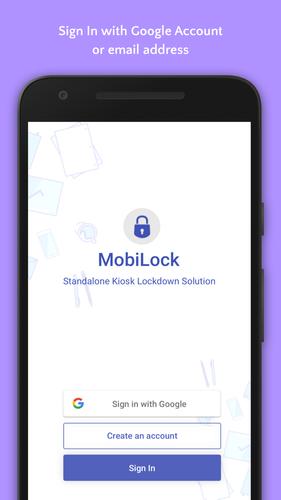
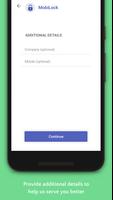
Step 2: Create your account with Google+ or regular email.

Step 3: Setup for your device in Kiosk Mode.

Note: If you are using MobiLock Basic in multiple devices please use the same email address or Google+ account on all the devices.

Areas of use:

- Digital Signage

- Tablets and Smartphones for field force

- Tablets at school/university

- School/University Kiosk Solutions

- Retails/Entertainment/Hospital/Enterprise Kiosk Solutions

- Custom Solutions

Contact Us:

Website : https://MobiLock.in
What's New in the Latest Version 2.3.1

Last updated on Nov 13, 2017 - Added Account Registration and Sign In Functionality
- Bug fixes and Improvements
Download(4.89MB)
Users also viewed
  • Hyakunin Isshu - Wasuramoti

    Hyakunin Isshu - Wasuramoti

    2.1.4 January 22, 2026
  • 3PAR Quick Specs

    3PAR Quick Specs

    1.0 January 22, 2026
  • Rahasia Sukses Bahasa Inggris

    Rahasia Sukses Bahasa Inggris

    1.0 January 22, 2026
  • Shree Ambica

    Shree Ambica

    1.8 January 22, 2026
  • G.E.C. Bharuch

    G.E.C. Bharuch

    1.2 January 21, 2026
  • Jira

    Jira

    157.1.9 January 21, 2026
  • Rohani Ilag in Hindi

    Rohani Ilag in Hindi

    2.2 January 20, 2026
  • Japanese-Indonesia Dictionary

    Japanese-Indonesia Dictionary

    0.2.5 January 20, 2026
  • English Nursery Rhymes - 01

    English Nursery Rhymes - 01

    2.2 January 20, 2026
  • English Flashcards For Kids

    English Flashcards For Kids

    4.0 January 19, 2026
  • ESHRE 2014

    ESHRE 2014

    1.0.3 January 19, 2026
  • R+F

    R+F

    20.7 January 18, 2026
  • Lyrebird: Learn HINDI

    Lyrebird: Learn HINDI

    13.6 January 18, 2026
  • EZeye IPC

    EZeye IPC

    1.8 January 18, 2026
  • Limo Connection 007

    Limo Connection 007

    1.399 January 18, 2026
About Privacy Policy Terms of Service Cooking Policy

© Copyright 2017-2026 downde.com