

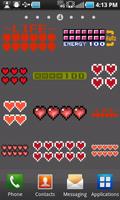
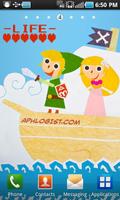
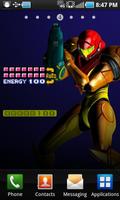
LifeMeter battery widget inspired by Legend of Zelda, Metroid, Skyrim & more!
This is the free version of LifeMeter. Please read everything below for instructions and important notes*.
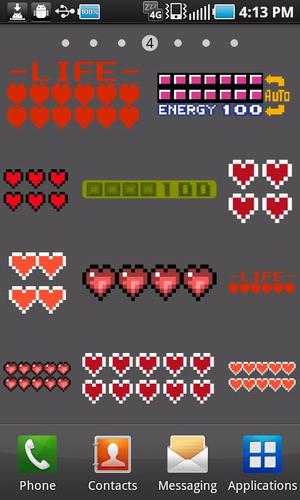
We at The Food Sucks are of the opinion that notions of battery life do not have to be measured with grim clinical concern. It should be FUN. Even nostalgic! Introducing LifeMeter, a widget that draws inspiration from decades of classic gaming fun and brings it to your Android device to enjoy. It takes the age-old iconic digital heart symbolizing LIFE and applies that feature to your Android device's battery. We also didn't merely draw inspiration from the meters of classic 8-bit games like Legend of Zelda and Metroid, we wanted to demonstrate that LifeMeter is capable of a modern styling too, and what better example than the health bar from a game like Skyrim!***
To make your experience special we made it *highly* configurable, because personalizing is fun and rewarding. Just take a look at the gallery to see not only the variety of meters offered, but how you can customize most of them to your heart's content! The widgets currently comes in 1x1 and 2x1 sizes, and even offers unique meters exclusive to each size to make your experience a little more fun and interesting. Heart widgets can be tweaked; rows/columns can be adjusted, scale them if you feel they might be too big. You can align them within the widget's frame (top, lower right, center, etc). You can configure a LifeMeter widget to launch an app when tapped, or show some detailed battery info instead. You can adjust how often updates happen - from once a minute to as little as once an hour if you want to conserve battery life - though LifeMeter does not use a persistent service; When the phone goes into sleep mode, no updates are issued to your widget, preserving battery health.
*Do not force the install to your SD Card, install it to internal memory only!
**If you use a TASK KILLER (you shouldn't) like ATK, STK, ETK, etc, you MUST configure it to *EXEMPT*, or else it will terminate the process and your widget will appear to be stuck/not updating!
We've tested extensively on multiple devices with great results. Should your device have any trouble with it, we'll do our best to address the issues, just contact us.
We'd like to add even more meters in future updates, and we're open to suggestions - send us an email!
**Some meters are available only in the full version.
----------------------------------------
TO PLACE A LIFEMETER WIDGET ON YOUR HOME SCREEN (pre ICE CREAM SANDWICH):
1. *Long-press* on an empty area of your home screen.
2. On the list, tap WIDGETS.
3. Scroll down the new list and find LifeMeter 1x1 or 2x1 and tap on either.
4. Configure the hell out of your supercool new widget.
5. Show your friends and family!
----------------------------------------
TO PLACE A LIFEMETER WIDGET ON YOUR HOME SCREEN (Android 4.0+, ICS+):
* Please note, at the moment (08/2012) there is a bug with *Jellybean* that may require you to REBOOT your device to install widgets from a newly installed app. You'd only need to do this once.
1. Navigate to your APP Drawer. (It may be an icon of 6 little dots or squares, on your home screen)
2. Select the "WIDGETS" tab.
3. Locate LifeMeter 1x1 or 2x1 - you may have to swipe side to side if your list is large.
4. *Long-press* one of the LifeMeter widgets until your Home Screen appears, then let go.
5. Configure the hell out of your supercool new widget.
6. Show your friends and family!







 Download